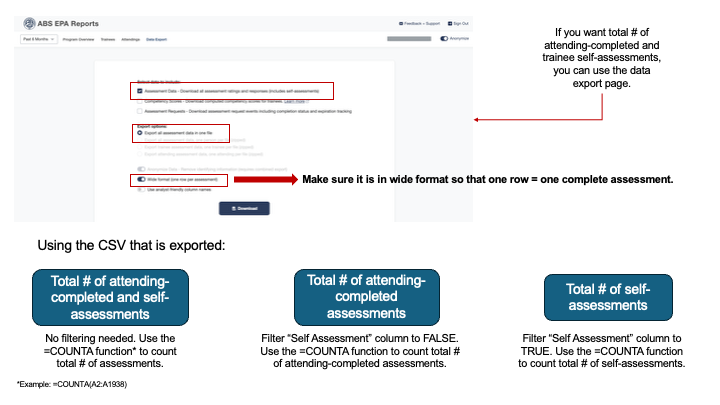
There are three ways for ABS programs to obtain the overall number of completed ABS EPA Assessments for their program on the program dashboard.
1. Using the Program overview page, you can view the total number of completed assessments by attendings within the selected timeframe in the "Completed Assessments" visual.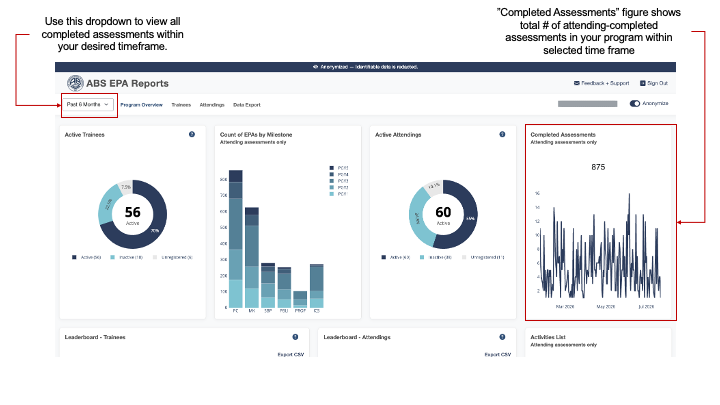
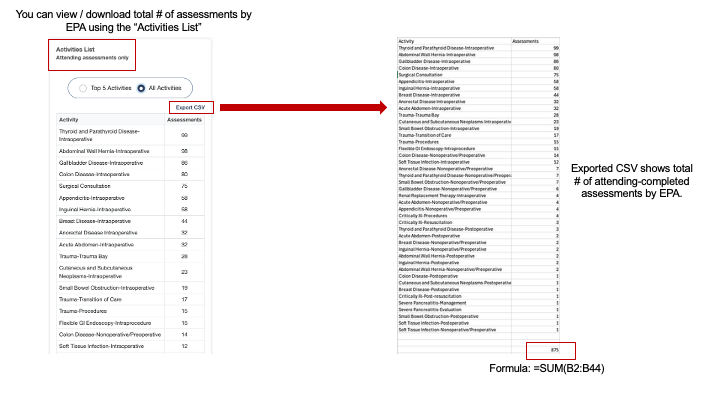
2. Using the "Activities List" on the Program Overview page, you can view total number of attending-completed assessments broken down by EPA. If you "Export CSV," you can download these counts per EPA and calculate total completed.
3. Using the Data Export page, you can download all assessment data and calculate the count of completed number of assessments. Make sure "wide format" is selected so that each row of data represents one complete assessment. If you want the total number of completed assessments (by attendings & trainee self-assessments) you can use the =COUNTA function in excel. If you want just the total number of attending-completed assessments or total number of trainee self-assessments, you can filter the "Self Assessment" column to FALSE or TRUE, respectively.