There are several places on the ABS EPA Dashboards for General Surgery that you can use to acquire some of the information that is needed to complete the ABS EPA-CCC worksheet. Please note that all Summative Entrustment decisions are meant to be generated by the Clinical Competency Committee, not obtained directly from the EPA Dashboard.
EPA CCC Report
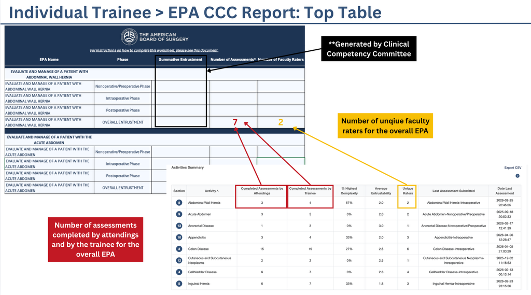
- Using the EPA CCC Report on the EPA Dashboards, you can complete the “Number of Assessments” and “Number of Faculty Raters” for the Overall EPA (i.e. Overall Abdominal Wall Hernia) and phase-specific EPAs (i.e. Abdominal Wall Hernia - Intraoperative).
- For “Number of Assessments,” you can use “Completed Assessments by Attending” and “Completed Assessments by Trainee.”
- For “Number of Faculty Raters,” you can use the “Unique Raters.”
- The summary table at the top of the report provides this data for all “Overall EPAs” as demonstrated in the screenshot below.
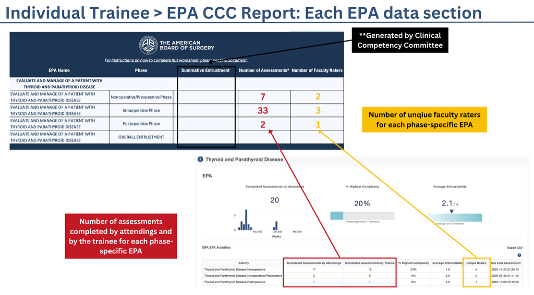
- For the phase-specific EPAs, you can click on the number next to the overall EPA in the table, which will take you to the phase-specific EPA section. Here you can find the “Number of Assessments” and “Number of Faculty Raters” for each phase of the EPA (as seen in the screenshot below).
Trainee Detail Pages
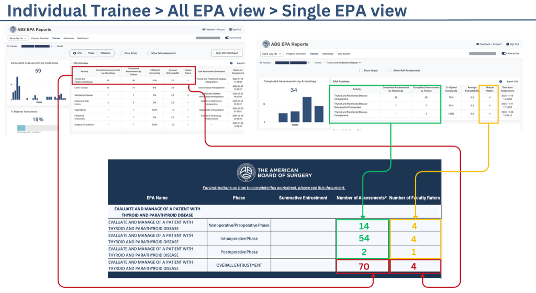
- You can also find the “Number of Assessments” and “Number of Faculty Raters” for the Overall EPA (i.e. Overall Thyroid & Parathyroid Disease) and phase-specific EPAs (i.e. Thyroid & Parathyroid Disease - Intraoperative) using the individual trainee detail pages
- Using the “All EPA” view, you can complete the “Number of Assessments” and “Number of Faculty Raters” for the overall EPA using the summary table at the top. Then, by clicking on the overall EPA of interest (for example, “Thyroid & Parathyroid Disease”), you are taken to the specific EPA page, where you can complete the count of assessments and faculty raters for each phase-specific EPA (see screenshot below).